Skip to content

oled gaming monitor 4k: OLED vs QD-OLED Panel Guide

Jordan Blake Jordan Blake 7 min read

OLED vs QD-OLED Panel Technology Compared

Choosing the right 4K OLED gaming monitor in 2026 comes down to panel type and how the display handles real-world use. WOLED from LG Display and QD-OLED from Samsung Display each offer flawless contrast and near-instant pixel response, but the two technologies differ in color purity, text clarity, and behavior in bright rooms—differences that decide whether an expensive monitor feels like the perfect gaming centerpiece or a compromise when work and play share one desk.

This guide is based on manufacturer specification pages from ASUS, Dell, LG, MSI, GIGABYTE, and Samsung; standards documentation from VESA and DisplayPort; and independent reporting from RTINGS.com and TFTCentral. The conclusions are about documented panel behavior and widely reported traits, not in-house lab measurements. If the room is bright and reflections are unavoidable, subpixel layout and panel coating matter as much as refresh rate. If HDR is a buying reason, VESA tiers matter more than marketing names. And if burn-in anxiety is real, warranty terms and built-in maintenance tools matter as much as panel generation.

The practical split starts with panel structure. RTINGS.com summarizes LG Display's WOLED as a white-emitting OLED layer paired with red, green, blue, and white subpixels, while Samsung Display's QD-OLED uses a blue light source and quantum dots for color conversion, with three subpixels rather than four. LG Display positions its newer Tandem WOLED as a stacked RGB light-source approach aimed at higher brightness and better efficiency, highlighting RGB-stripe subpixel structures as a text-clarity lever.

For pure gaming performance, the best news is that high-refresh 4K OLED has standardized around 240 Hz at the premium end. ASUS lists the ROG Swift OLED PG32UCDM as a 32-inch 4K QD-OLED at 240 Hz with a 0.03 ms GTG response time and USB-C power delivery up to 90 W. MSI's MPG 321URX QD-OLED spec sheet likewise calls out 3840x2160, 240 Hz, 0.03 ms GTG, and USB-C with 90 W PD. Dell lists the Alienware AW3225QF as a 4K QD-OLED display that supports 240 Hz, with both DisplayPort 1.4 and HDMI 2.1 inputs.

Key Takeaways

  • QD-OLED offers superior color purity and higher brightness but can show purple-tinted blacks in bright rooms due to the lack of a polarizer.
  • WOLED provides better text clarity and handles ambient light more gracefully, making it the safer choice for mixed use in bright environments.
  • All premium 4K OLED gaming monitors now support 240 Hz refresh rates with 0.03 ms response times, standardizing competitive gaming performance.
  • DisplayPort 2.1 UHBR20 offers up to 80 Gbps bandwidth, future-proofing connectivity for high-end GPU and multi-display workflows.
  • VESA DisplayHDR True Black 400 is a meaningful baseline, but OLED's automatic brightness limiting behavior remains a design reality in real use.
  • Burn-in management is a normal ownership feature: Dell and MSI provide 3-year warranties with explicit panel burn-in coverage.

Panel Structure and Subpixel Layout

LG Display's WOLED uses a white-emitting OLED layer combined with red, green, blue, and white subpixels. The white subpixel helps boost brightness and efficiency, while the RGB elements handle color accuracy. LG's newer Tandem WOLED stacks two RGB light sources, aiming for higher sustained brightness and improved power efficiency. The company highlights RGB-stripe subpixel structures as a key advantage for text rendering, positioning WOLED as a better fit for productivity tasks where UI clarity matters.

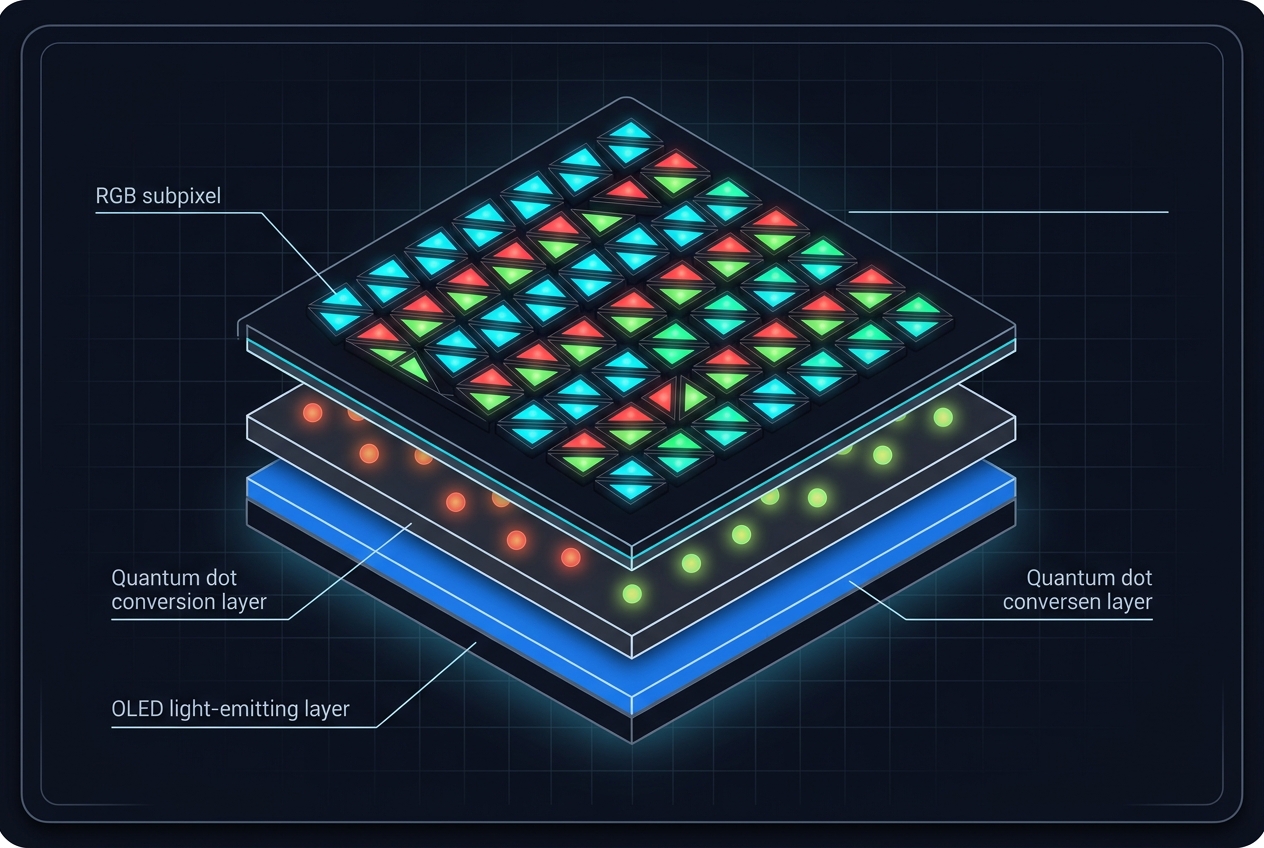
Samsung Display's QD-OLED takes a different approach: a blue OLED light source paired with quantum dots for color conversion. Quantum dots are nanometer-scale particles whose size determines emitted color, and Samsung argues that this conversion method improves color purity and light transmission compared to traditional color filters. The technology uses three subpixels instead of four, which contributes to its triangular subpixel arrangement—a layout that can affect text clarity in ways WOLED avoids.

TFTCentral notes that Samsung Display's QD-OLED panels have historically used a triangular RGB subpixel arrangement that can cause text clarity problems, with improvements coming via higher pixel density and newer panel designs. RTINGS.com points out that QD-OLED uses a triangular subpixel layout, and that WOLED subpixel order has changed across generations. If long sessions of spreadsheets, coding, or any workflow with lots of small UI text are part of the daily routine, this subpixel difference is why a monitor that looks amazing in games isn't always the full story.

For buyers who do photo editing or any work involving tone-sensitive content, OLED's automatic brightness limiting behavior and ambient-black performance still influence editing comfort. Dell's AW3225QF page claims Delta E less than 2 accuracy and 99 percent DCI-P3 coverage for its panel, and GIGABYTE lists DCI-P3 99 percent and 10-bit color depth for the AORUS FO32U2P. Those specs are attractive on paper, but OLED's ABL behavior, panel maintenance cycles, and ambient-black behavior still matter. For many photographers, OLED is a powerful secondary display for culling and proofing, while a calibrated IPS screen remains the safer primary when absolute consistency is the goal.


HDMI 2.1 and DisplayPort 2.1 UHBR

Connectivity is where spec sheets start separating works from works at full capability. MSI explicitly markets full 48 Gbps bandwidth for HDMI 2.1 on the MPG 321URX QD-OLED, which matters if the goal is high refresh at 4K without odd bandwidth fallbacks. On the standards side, HDMI Forum, Inc. announced that HDMI 2.1 introduced a 48G cable enabling up to 48 Gbps bandwidth. For DisplayPort, the biggest forward-looking differentiator is DisplayPort 2.1 UHBR support. GIGABYTE markets the AORUS FO32U2P as featuring DisplayPort 2.1 UHBR20, and the DisplayPort press release describing VESA certified DP80 cables states UHBR20 with four lanes provides up to 80 Gbps maximum throughput. In plain buyer terms: if a setup is built around the newest GPUs and high-end capture or multi-display workflows, a DP 2.1 UHBR20 line item is not fluff. HDR claims are where OLED spec sheets can mislead unless you anchor them to VESA. Many OLED gaming monitors cluster at VESA DisplayHDR True Black 400, including MSI's MPG 321URX QD-OLED, and Dell's AW3225QF product page explicitly ties VESA DisplayHDR True Black 400 to HDR positioning. LG lists DisplayHDR True Black 400 on the 32GS95UE-B product page as well. VESA's DisplayHDR performance criteria under CTS 1.2 released May 7, 2024 spells out what True Black tiers are supposed to enforce, including extremely low black levels at 0.0005 cd/m² and defined luminance targets. The takeaway: DisplayHDR True Black 400 is meaningful as a minimum-bar badge, but it is not a guarantee of sustained full-screen brightness in real use—OLED's automatic brightness limiting behavior is still a design reality even when the badge is present.

Close-up diagram of QD-OLED panel structure showing blue light source and quantum dot layer
QD-OLED panels use quantum dots for color conversion with a triangular subpixel layout

Text Clarity and Ambient Light Behavior

Two critical trade-offs separate WOLED and QD-OLED when the monitor serves both gaming and productivity: subpixel layout affects text rendering, and panel coating affects how blacks appear in bright rooms.

Subpixel Layout and Text

Text and UI clarity is the most underestimated deal-breaker for buyers who split time between games and work. RTINGS. TFTCentral is more blunt: it says Samsung Display's QD-OLED panels have historically used a triangular RGB subpixel arrangement that can cause text clarity problems, with improvements coming via higher pixel density and newer panel designs. If you're doing long sessions of spreadsheets, coding, or any workflow that involves lots of small UI text around images, this is why a monitor that looks amazing in games isn't the full story for desktop work.

Ambient Light Performance

Ambient light behavior is a second, often surprising, trade-off between WOLED and QD-OLED. RTINGS.com explicitly advises choosing QD-OLED for dark-room use but preferring WOLED in brighter rooms, stating that QD-OLEDs lack a polarizer and can make blacks look purple in bright conditions. That characteristic is not a minor nuance—if the display sits opposite a window or under strong overhead lighting, it can decide whether OLED's contrast advantage is visible during daytime use. For a buyer who wants a monitor for photo work, OLED's ABL behavior, panel maintenance cycles, and ambient-black behavior still influence editing comfort even when color specs are attractive on paper.

Burn-In Management and Warranty Coverage

Burn-in management should be treated as a normal ownership feature, not a taboo topic. Dell's product page for the Alienware AW3225QF explicitly lists 3-Year Advanced Exchange Service and Premium Panel Exchange including coverage for OLED burn in. Those explicit warranty statements are the difference between an OLED monitor that feels high-maintenance and one that feels predictable.

Dell's Alienware AW3225QF Monitor User's Guide documents maintenance routines in detail. It describes a Pixel Refresh that can run automatically after 4 hours of use and takes about 6 to 8 minutes, and a Panel Refresh that is associated with 7000 hours of accumulated use and can take about an hour. Understanding these cycles before purchase helps set realistic expectations: the display will occasionally interrupt use for maintenance, but the process is documented and predictable rather than a mysterious black box.

LG's 32GS95UE-B is explicitly positioned by LG as a Dual Mode OLED: 4K up to 240 Hz or FHD up to 480 Hz, again with a cited 0.03 ms response time. The flexibility to switch between resolutions and refresh rates gives competitive players a higher frame rate option without requiring a second monitor, and the built-in mode switching preserves the OLED panel investment across different gaming scenarios.

Pre-Purchase Spec Sheet Checklist

  • Panel type: WOLED or QD-OLED
  • DisplayHDR tier: True Black level stated
  • Refresh rate: native, not overclocked
  • Inputs: HDMI 2.1 and DisplayPort version
  • USB-C: power delivery wattage
  • VRR support: stated compatibility
  • Coating: matte or anti-reflection notes
  • Warranty: burn-in coverage stated

Premium 4K 240 Hz Models

Leading QD-OLED Gaming Monitors

Current Generation

Leading QD-OLED Gaming Monitors

ASUS ROG Swift OLED PG32UCDM, Dell Alienware AW3225QF, MSI MPG 321URX QD-OLED, and GIGABYTE AORUS FO32U2P all deliver 32-inch 4K QD-OLED panels at 240 Hz with 0.03 ms response times and USB-C power delivery up to 90 W. These models represent the current premium tier, offering color punch and HDR presentation in controlled lighting environments. For buyers prioritizing competitive gaming and HDR content in dark rooms, QD-OLED is the sharpest recommendation.

Choosing Between WOLED and QD-OLED

QD-OLED is the sharpest recommendation for buyers prioritizing color punch and premium HDR presentation in controlled lighting—especially in the current wave of 32-inch 240 Hz models like ASUS ROG Swift OLED PG32UCDM, Dell Alienware AW3225QF, MSI MPG 321URX QD-OLED, and GIGABYTE AORUS FO32U2P. These panels deliver superior color purity and higher sustained brightness when ambient light is minimal, making them ideal for dark-room gaming and HDR content consumption. WOLD, and especially flexible designs like LG's 32GS95UE-B Dual Mode, is the better bet when the room is bright, when text clarity is a daily concern, or when a single display has to cover both competitive play and office hours. WOLED handles ambient light more gracefully thanks to its polarizer, and the RGB-stripe subpixel layout produces sharper text rendering for productivity tasks. If the monitor will sit opposite a window or under strong overhead lighting, WOLED avoids the purple-tinted blacks that QD-OLED can show in bright conditions. The main trade-off is simple and non-negotiable: OLED's strengths—flawless per-pixel contrast, near-instant response times, and vivid color—are immediate. But the ownership experience is defined by ambient light behavior, subpixel layout, and maintenance and warranty terms, not just the headline refresh rate. A buyer who ignores these factors will end up with an expensive compromise instead of a perfect fit.

Final Verdict

Panel Choice Depends on Your Room and Workflow

QD-OLED wins color purity and HDR presentation in dark rooms. WOLED wins text clarity and ambient light handling for mixed-use setups. Both deliver 240 Hz and near-instant response, so the decision comes down to lighting conditions and daily tasks—not just gaming specs.

Explore More

Read Our Full Monitor Reviews

Compare detailed specifications, performance analysis, and real-world usage insights across the latest 4K OLED gaming monitors.

Jordan Blake

Jordan Blake

Monitor Technology Writer

Jordan covers ultrawide and productivity-focused monitors, researching ergonomic features, connectivity options, and price-performance positioning across current market offerings.

Sources

  1. ASUS — ROG Swift OLED PG32UCDM | Monitors | ROG USA
  2. Dell — Alienware 32 4K QD-OLED Gaming Monitor - AW3225QF | Dell USA
  3. MSI — MPG 321URX QD-OLED Specifications
  4. LG — 32-Inch UltraGear OLED Gaming Monitor - 32GS95UE-B | LG USA
  5. GIGABYTE — AORUS FO32U2P - GIGABYTE Global
  6. Samsung — 32" 4K UHD G80SD Odyssey OLED G8 Gaming Monitor | Samsung US